How to access your new digital banking

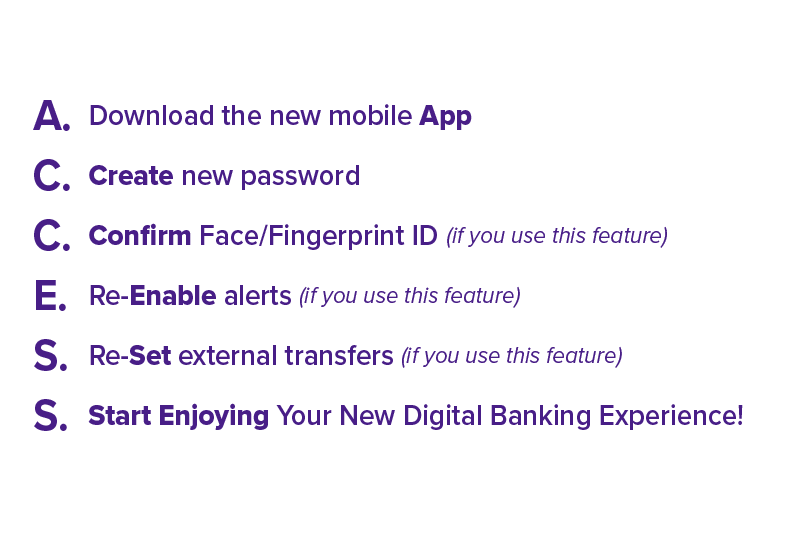
Create New Password / Existing Member First Time Sign On

  Link to instructions

Re-Enable Alerts

  Link to instructions

External Account Transfer

  Link to instructions

Getting Started

Dashboard Tour

New Member Registration

  Link to instructions

Create New Password / Existing Member First Time Sign On

  Link to instructions

Dashboard Customization

  Link to instructions

Account Access & Recovery

Forgot Password

  Link to instructions

Forgot Username

  Link to instructions

Transfers

New Transfers

  Link to instructions

Scheduled Transfers

  Link to instructions

Transfer History

  Link to instructions

External Account Transfers (outside Credit Union)

  Link to instructions

Member to Member Transfers (inside Credit Union) Using an Account Number

  Link to instructions

Member to Member Transfers (inside Credit Union) Using a Code

  Link to instructions

Member to Member Transfers (inside Credit Union) Creating a Code

  Link to instructions

Payments

Check Stop Payment - History

  Link to instructions

Bill Pay

Bill Pay - Setup a New Payee Automatic (Existing)

  Link to instructions

Bill Pay - Setup a New Payee Manual (Not Existing)

  Link to instructions

Bill Pay - Editing a Payee

  Link to instructions

Bill Pay - Deleting a Payee

  Link to instructions

Bill Pay - Make a Payment

  Link to instructions

Bill Pay - Expedited Check Delivery

  Link to instructions

Bill Pay Settings - Default Payment Method

  Link to instructions

Bill Pay Settings - Notifications

  Link to instructions

Alerts

Quicken & QuickBooks

Article
Quicken Step-by-Step Guide
Learn how to reconnect Quicken to your accounts after the Digital Banking upgrade.
View Article →
Article
QuickBooks Step-by-Step Guide
Follow these instructions to reconnect QuickBooks after the Digital Banking upgrade.
View Article →

Ready to get started?

Choose an option below to download the Digital Banking app.